Accessing Outbound Flights Cargo
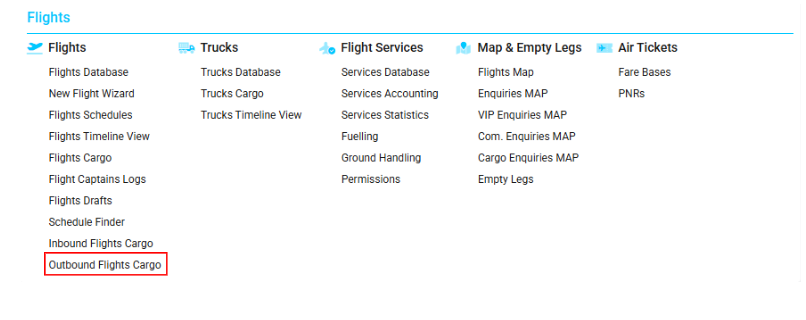
Navigate to the Flights section and under the Flights Section, click the “Outbound Flights Cargo” Button.
Overview
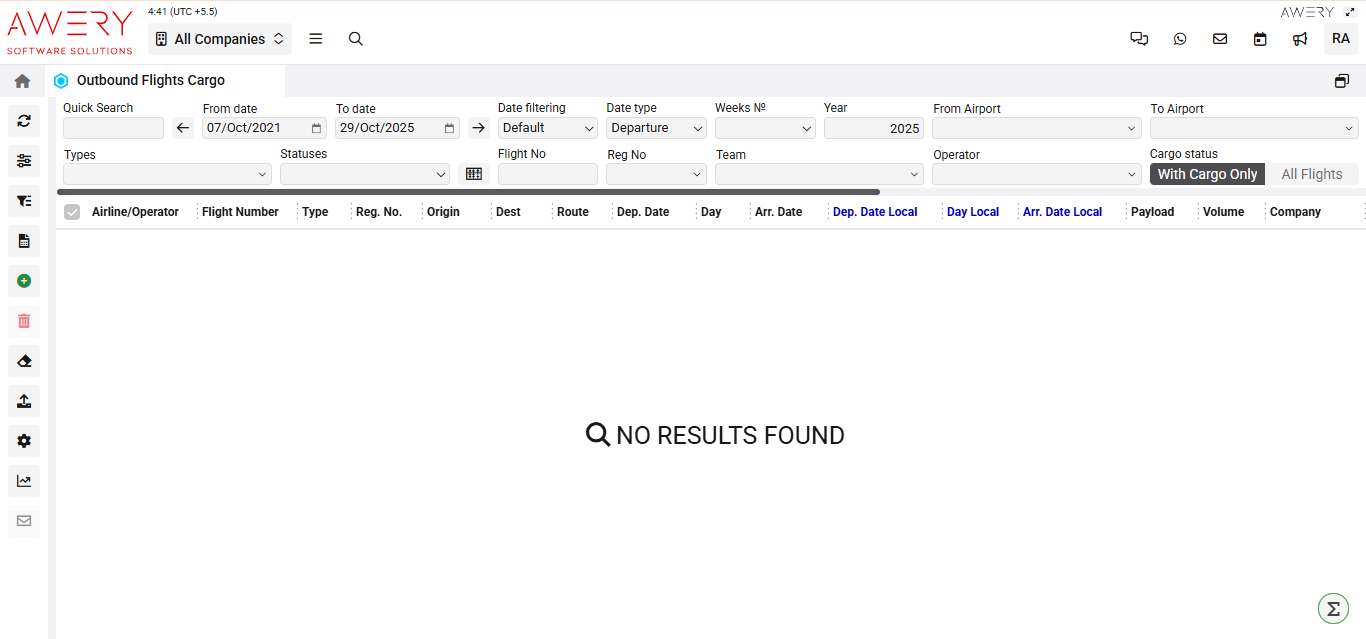
The Outbound Flights Cargo module displays a tabular list of all scheduled outbound flights carrying cargo. Users can filter results, conduct searches, and review essential details for each flight.
Search Filters and Controls
-
Quick Search: Instantly filter results by airline, operator, flight number, or other data.
-
Date Range (From/To): Set the start and end dates for displayed outbound flights.
-
Date Filtering: Choose logic for date interpretation (Default, Strict, Custom).
-
Date Type: Select whether filters apply to Departure or Arrival dates.
-
Weeks Number/Year: Refine listings by specific operational week(s) and year.
-
From/To Airport: Search flights between two specific airports.
-
Types: Filter by cargo type or flight category.
-
Statuses: Filter by operational or workflow status of the flight.
-
Flight No / Reg No: Locate flights by their number or aircraft registration.
-
Team: Filter by crew or team.
-
Operator: Limit results by specific air carrier.
-
Cargo Status: Select either "With Cargo Only" (default) or "All Flights" (overrides cargo filter).
Main Table Columns
-
Airline/Operator: Name of the airline or cargo operator.
-
Flight Number: Scheduled flight's unique identifier.
-
Type: Model or aircraft type for the outgoing flight.
-
Reg. No.: Registration number of the aircraft.
-
Origin: Departure airport code or location.
-
Dest: Arrival/destination airport code or location.
-
Route: Designated path or routing for the flight.
-
Dep. Date: Scheduled UTC departure date/time.
-
Day: Day of the week for departure.
-
Arr. Date: Scheduled UTC arrival date/time.
-
Dep. Date Local: Departure time at origin in local airport timezone.
-
Day Local: Day of the week at local airport for departure.
-
Arr. Date Local: Arrival time in destination's local timezone.
-
Payload: Cargo load assigned to the flight.
-
Volume/Company: Total cargo volume and the associated logistic company (when provided).
Visual Reference
(The following screenshot displays the Outbound Flights Cargo interface, including filter fields, and column headers.)