
FOH
FSU FOH message in accordance to IATA shows that Consignment is on hand pending “ready for carriage” determination.
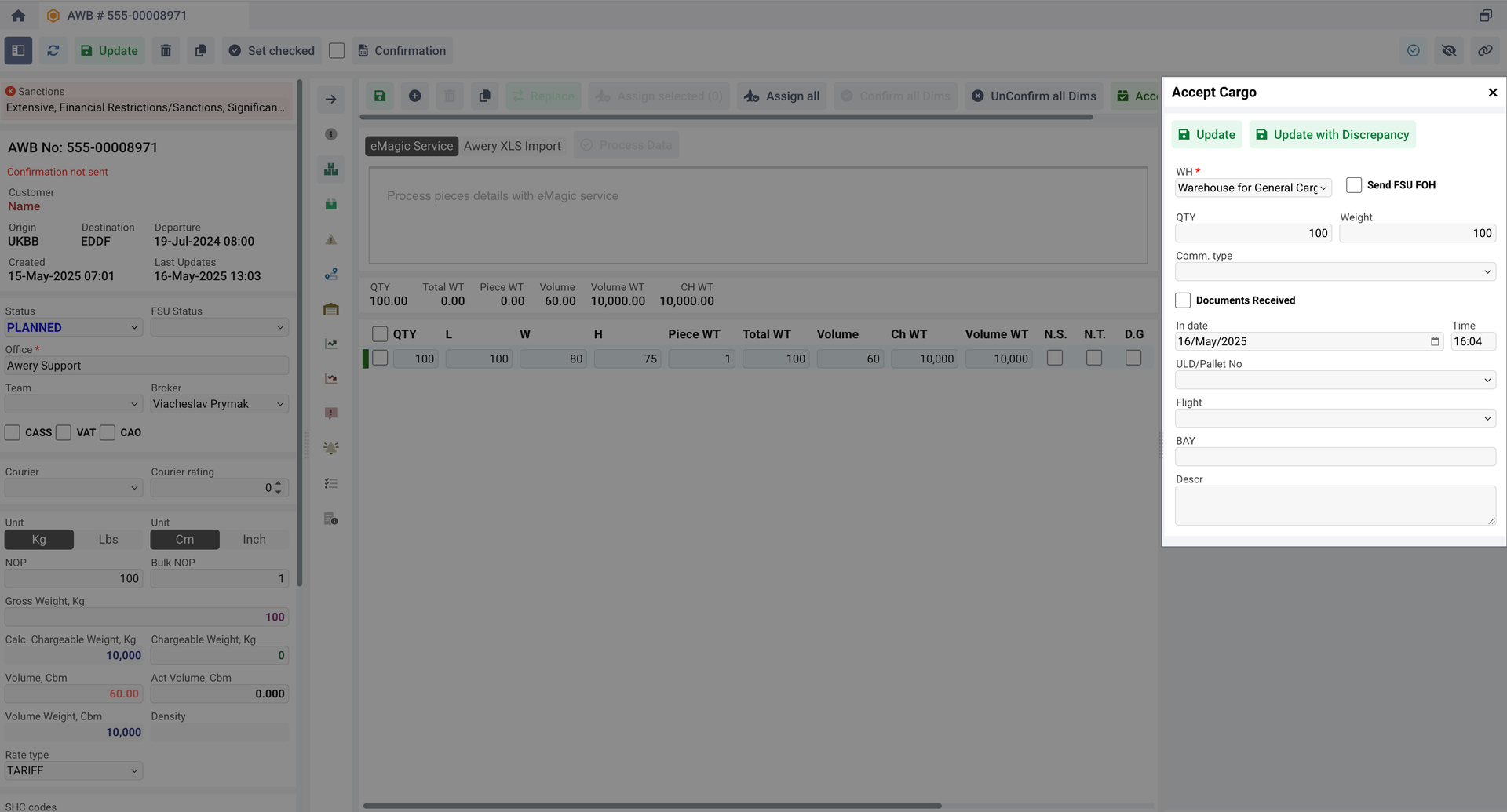
The option to send FSU FOH message is optional and available when creating a record of receiving cargo to warehouses with a Acceptance Zone usage type from all interfaces.
You can read about Cargo Warehouses and their setup in our guide: https://awerycloud.atlassian.net/wiki/spaces/Awery/pages/262406147/How+to+operate+with+Cargo+WHs+in+AWERY+ERP?atlOrigin=eyJpIjoiNzY1MjliMjcxYjAwNDdkM2FiMjY1ZGM0NTM4MTcyOTMiLCJwIjoiYyJ9
The AWERY ERP will take next steps to send this message:
-
System will search suitable flight operator contacts (if the Warehouse Data record has a Flight specified, the system will take operator from it otherwise from the AWB airline).
-
Contact has to be with FSU_FOH message type, so system can define where to send message.
-
Destination of the AWB must be in the list of mentioned airports of the contact
-
-
Than system search for template called FSU FOH generic_ in the database, but if among the contacts of found operator there is a contact data with the Template type, then system take its content as a name of template in priority.
-
System will take the transport either from the template, or from the contact data with the Transport type.
-
Similarly to the sender, it will be taken either from the template, or from the contact data with the From E-Mail type
-
The recipients (to,cc,bcc) will be taken both from the template and from all contact datas with E-Mail type.
-
After sending, AWB FSU status will be changed to FOH.
-
Also after sending AWB Tracking message with FOH status will be created.
RCS
FSU RCS message in accordance to IATA shows that Consignment physically received from a shipper or an agent.
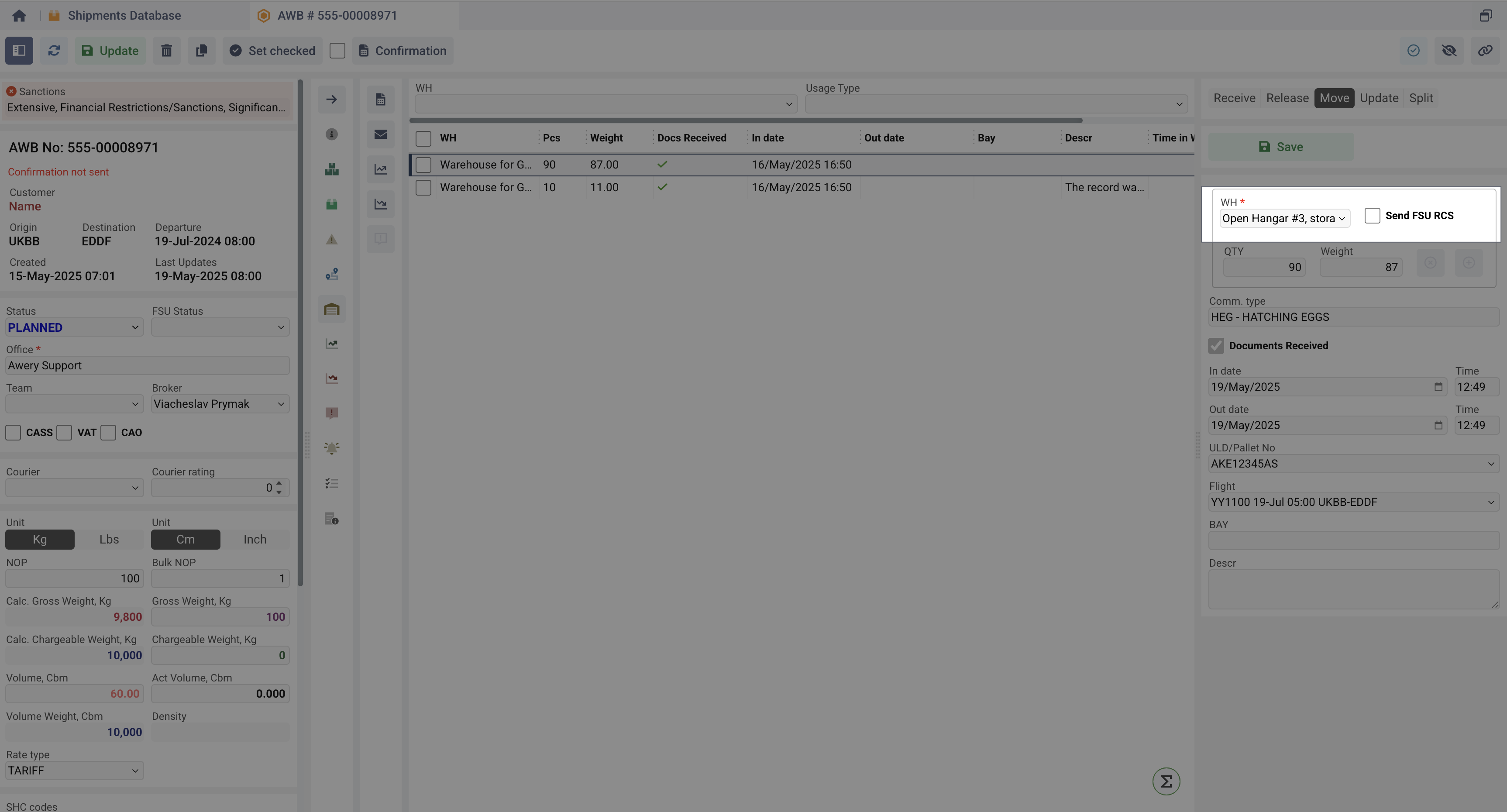
The option to send FSU RCS message is optional and available when creating a record of receiving cargo to warehouses with a Storage Zone usage type from all interfaces.
You can read about Cargo Warehouses and their setup in our guide: https://awerycloud.atlassian.net/wiki/spaces/Awery/pages/262406147/How+to+operate+with+Cargo+WHs+in+AWERY+ERP?atlOrigin=eyJpIjoiNzY1MjliMjcxYjAwNDdkM2FiMjY1ZGM0NTM4MTcyOTMiLCJwIjoiYyJ9
The AWERY ERP will take next steps to send this message:
-
System will search suitable flight operator contacts (if the Warehouse Data record has a Flight specified, the system will take operator from it otherwise from the AWB airline).
-
Contact has to be with FSU_RCS message type, so system can define where to send message.
-
Destination of the AWB must be in the list of mentioned airports of the contact
-
-
Than system search for template called FSU RCS generic_ in the database, but if among the contacts of found operator there is a contact data with the Template type, then system take its content as a name of template in priority.
-
System will take the transport either from the template, or from the contact data with the Transport type.
-
Similarly to the sender, it will be taken either from the template, or from the contact data with the From E-Mail type
-
The recipients (to,cc,bcc) will be taken both from the template and from all contact datas with E-Mail type.
-
After sending, AWB FSU status will be changed to RCS.
-
Also after sending AWB Tracking message with RCS status will be created.
PRE
FSU PRE message in accordance to IATA shows that Consignment prepared for loading.
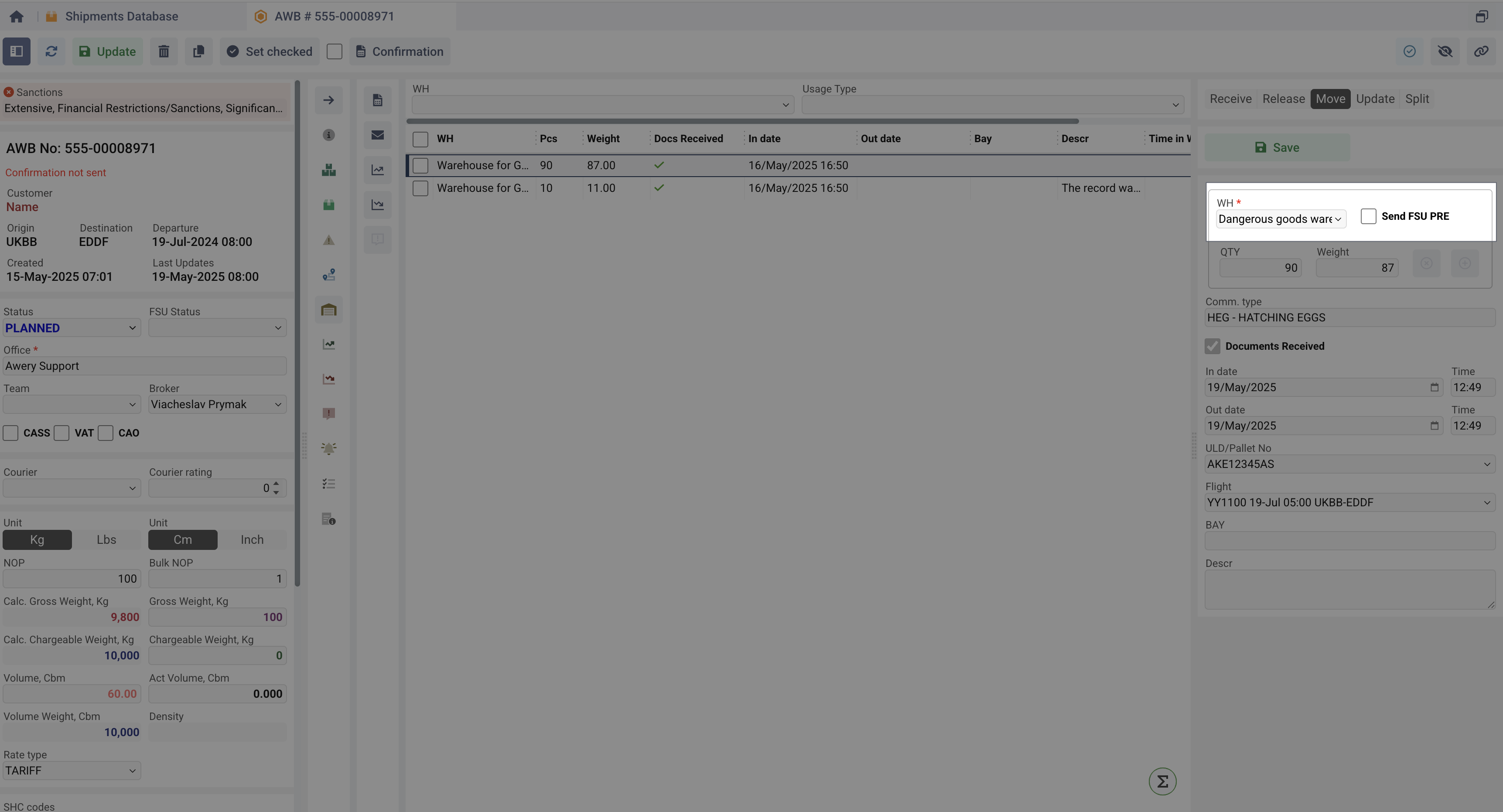
The option to send FSU PRE message is optional and available when creating a record of receiving cargo to warehouses with a Build Up Zone usage type from all interfaces.
You can read about Cargo Warehouses and their setup in our guide: https://awerycloud.atlassian.net/wiki/spaces/Awery/pages/262406147/How+to+operate+with+Cargo+WHs+in+AWERY+ERP?atlOrigin=eyJpIjoiNzY1MjliMjcxYjAwNDdkM2FiMjY1ZGM0NTM4MTcyOTMiLCJwIjoiYyJ9
The AWERY ERP will take next steps to send this message:
-
System will search suitable flight operator contacts (if the Warehouse Data record has a Flight specified). If Flight is not specified message will not be sent.
-
Contact has to be with FSU_PRE message type, so system can define where to send message.
-
Destination of the AWB must be in the list of mentioned airports of the contact
-
-
Than system search for template called FSU PRE generic_ in the database, but if among the contacts of found operator there is a contact data with the Template type, then system take its content as a name of template in priority.
-
System will take the transport either from the template, or from the contact data with the Transport type.
-
Similarly to the sender, it will be taken either from the template, or from the contact data with the From E-Mail type
-
The recipients (to,cc,bcc) will be taken both from the template and from all contact datas with E-Mail type.
-
After sending, AWB FSU status will be changed to PRE.
-
Also after sending AWB Tracking message with PRE status will be created.
RCF
FSU RCF message in accordance to IATA shows that Consignment physically received from a given flight or surface transport of the given airline.
The option to send FSU RCF message is optional and available when creating a record of receiving cargo to warehouses with a Dispatch Zone usage type from all interfaces.
You can read about Cargo Warehouses and their setup in our guide: https://awerycloud.atlassian.net/wiki/spaces/Awery/pages/262406147/How+to+operate+with+Cargo+WHs+in+AWERY+ERP?atlOrigin=eyJpIjoiNzY1MjliMjcxYjAwNDdkM2FiMjY1ZGM0NTM4MTcyOTMiLCJwIjoiYyJ9
The AWERY ERP will take next steps to send this message:
-
System will search suitable flight operator contacts (if the Warehouse Data record has a Flight specified, the system will take operator from it otherwise from the AWB airline).
-
Contact has to be with FSU_RCF message type, so system can define where to send message.
-
Destination of the AWB must be in the list of mentioned airports of the contact
-
-
Than system search for template called FSU RCF generic_ in the database, but if among the contacts of found operator there is a contact data with the Template type, then system take its content as a name of template in priority.
-
System will take the transport either from the template, or from the contact data with the Transport type.
-
Similarly to the sender, it will be taken either from the template, or from the contact data with the From E-Mail type
-
The recipients (to,cc,bcc) will be taken both from the template and from all contact datas with E-Mail type.
-
After sending, AWB FSU status will be changed to RCF.
-
Also after sending AWB Tracking message with RCF status will be created.