Accessing Trucks Database
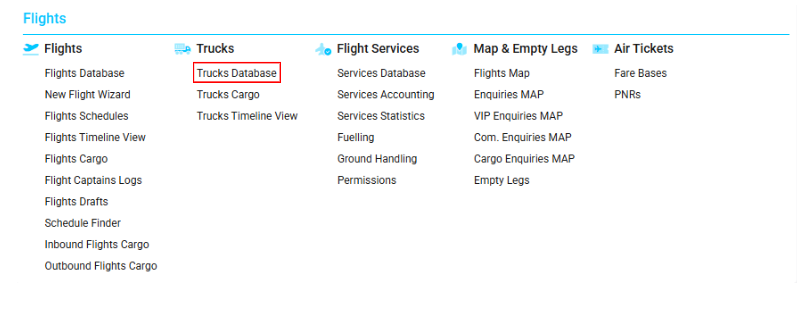
Navigate to the Flights section and under the Trucks Section, click the “Trucks Database” Button.
Overview
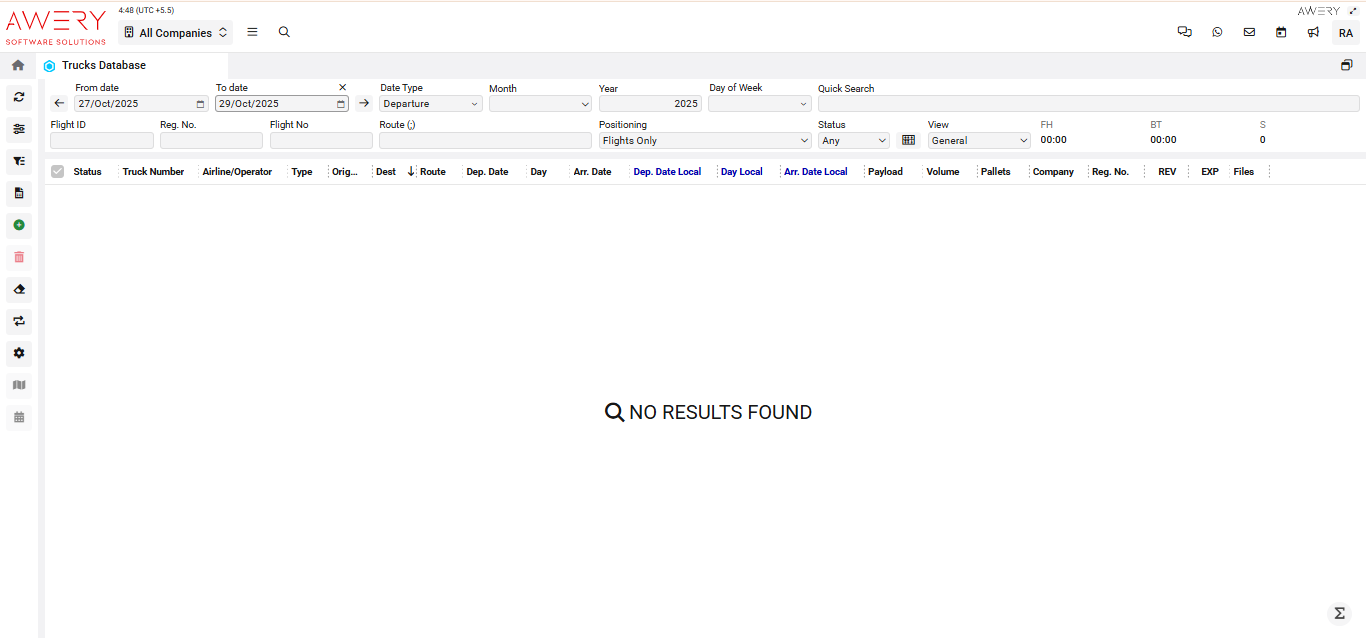
The Trucks Database lists all recorded truck operations tied to flight logistics, empowering users to filter, sort, and review important trip data.
Search Filters and Controls
-
From date/To date: Specify the start and end range for truck activities.
-
Date Type: Choose from Departure, Arrival, or other operational date types.
-
Month/Year/Day of Week: Refine database listings by time period, year, or particular weekdays.
-
Quick Search: Find records matching specific keywords or parameters.
-
Flight ID / Reg. No. / Flight No. / Route: Enter unique identifiers for immediate lookup.
-
Positioning: Filter by flights only or all truck moves.
-
Status: Select by operational or logistical status.
-
View: Choose report type (General, Summary, Detail, or custom layouts).
-
FH (Flight Hours), BT (Block Time), S (Sector): Summary of operational metrics, displayed for the chosen time range.
Main Table Columns
-
Status: Current operational status of the truck/record.
-
Truck Number: Unique identifier or license number.
-
Airline/Operator: Associated airline, cargo, or logistics operator.
-
Type: Truck category or type (box, flatbed, etc.).
-
Origin: Point of origin/departure for the journey.
-
Dest: Destination for the truck’s trip.
-
Route: Path or corridor traversed during the operation.
-
Dep. Date: Departure date in UTC.
-
Day: Scheduled day for the trip.
-
Arr. Date: Arrival date in UTC.
-
Dep. Date Local: Local time (origin) for departure.
-
Day Local: Day of the week at the origin, local time.
-
Arr. Date Local: Local time (destination) for arrival.
-
Payload: Cargo carried in weight or volume.
-
Volume: Total volume (cubic meters or appropriate unit).
-
Pallets: Number of cargo pallets transported.
-
Company: Logistics or operating company name.
-
Reg. No.: Truck’s registration or license number.
-
REV / EXP: Revenue and expense figures associated with movement.
-
Files: Attached operational or customs files relating to this record.
Visual Reference
(The following screenshot shows the Trucks Database interface, filter section, and complete set of data columns.)