
HOME > Shipments Database > Actions > Import/Export
CASS File Import
The CASS Import module allows users to import IATA CASS reports, review the parsed data before applying any changes, compare imported records with existing AWBs in the system, and either create new AWBs or update existing ones.
1. Uploading a CASS File
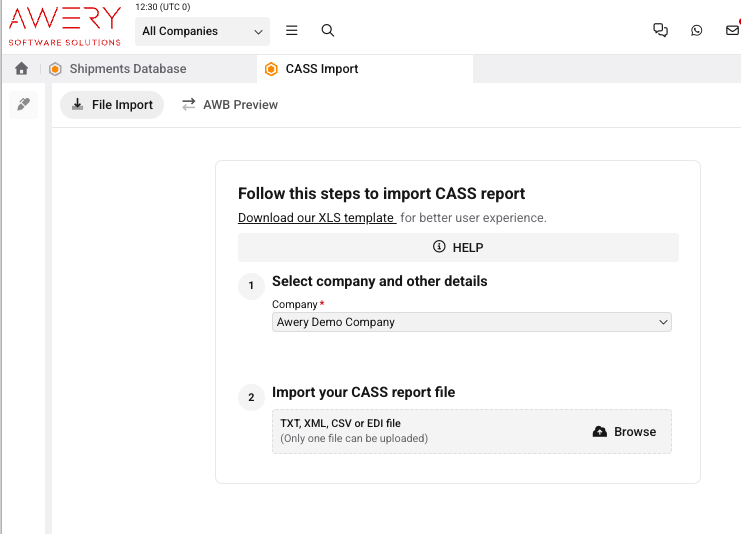
The CASS Import > File Import page is the entry point of the import process.
Before uploading a file, the user should:
-
Select the Company (required field. User’s default company is populated automatically).
-
Upload a CASS report in one of the supported formats:
-
TXT, hot
-
After the file is uploaded, the system parses all supported fields and opens the AWB Preview page.
2. AWB Preview
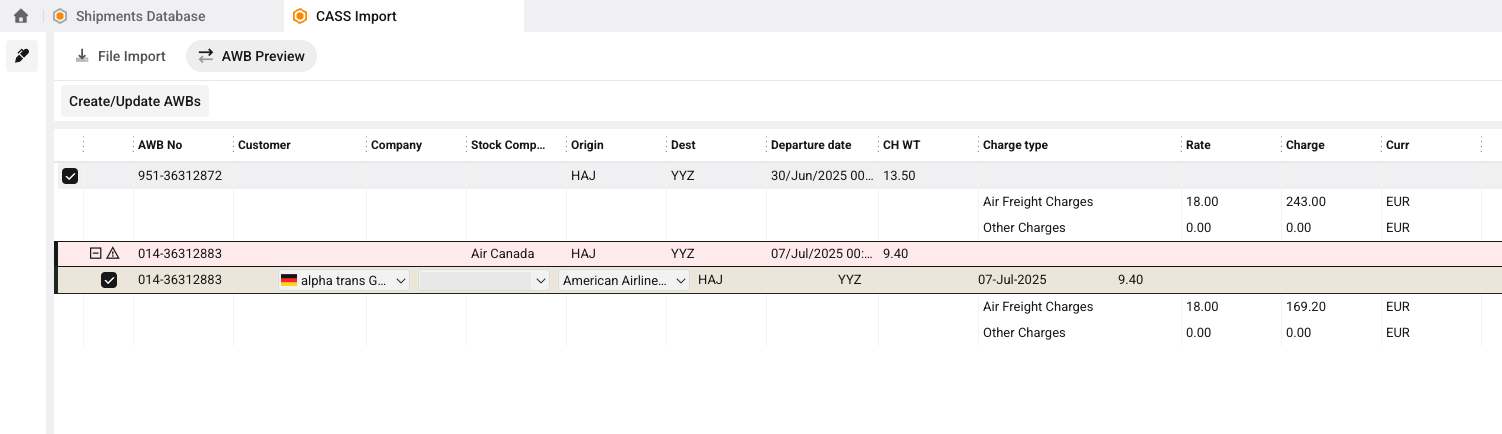
After parsing, all recognized AWBs are displayed in the preview grid.
For every imported record, the system searches for an existing AWB using the AWB Number.
The preview allows the user to compare imported information with existing records before saving.
The grid indicates:
-
existing AWBs found in the system;
-
new AWBs that will be created are not marked by any color;
-
parsed revenue lines;
-
validation warnings (missing customer, stock company, airport, etc.);
-
editable fields before import.
Preview Screen
3. Editing AWBs by Actions button
Before saving, users may select one or more rows and assign common values to all selected AWBs.
Typical bulk operations include:
-
Company
-
Stock Company
-
Customer
This allows correcting incomplete data without modifying every row individually.
4. Saving the Import
After reviewing the preview, users can execute one of the following actions.
Create New AWBs
If an imported AWB does not exist in the system, a new AWB is created together with its revenue records.
Update Existing AWBs
If an imported AWB already exists, the system updates the existing record with parsed information.
Revenue information will be updated as additional lines for already existing AWBs.
5. Supported CASS Fields
The following table describes all fields recognized from the CASS report and how they are mapped into the system.
AWB Records Created
The AWB specified in the CASS report will be created with specified parameters:
-
AWB No - recognised by Airline Prefix + AWB Serial Number in the file
-
Company - required field when the file is uploaded
-
Stock Company - recognised by Airline Prefix in the file. Branch Office Indicator can be additional marker for Airline search
-
Customer - recognised by Agent Code (
iata_cass_numberin AWERY) in the file -
VAT Indicator - recognised by VAT Indicator in the file
-
Origin - Origin IATA code
-
Destination - Destination IATA code
-
Departure Date - Date AWB Execution in the file
-
Gross Weight - Gross Weight Last two digits are decimal places. Example:
0003200→32.00. -
Weight Unit - Weight Indicator (
K→kg;L→lbs) in the file
Revenue Records Created
BASIC Revenue
Generated from Weight Charge (PP).
|
Field |
Value |
|---|---|
|
Charge Type |
BASIC |
|
Calculated Type |
CH Weight |
|
Quantity |
AWB Gross Weight |
|
Amount |
Weight Charge |
|
Rate |
Amount ÷ Quantity |
OTHER Revenue
Generated from Charges Due Carrier (PP).
|
Field |
Value |
|---|---|
|
Charge Type |
OTHER |
|
Calculated Type |
Per AWB |
|
Quantity |
1 |
|
Amount |
Charges Due Carrier |
|
Rate |
Amount |
Currency Processing
The currency specified in the CASS report is assigned to the Revenue and Revenue Data records.
The system also determines the exchange rate automatically by:
-
Resolving the imported currency.
-
Determining the company's default currency (selected Company or the user's default Company).
-
Retrieving the currency rate valid on the AWB Departure Date.
-
Saving both the currency and exchange rate together with the revenue records.
Validation Rules
During parsing, the system validates imported data and highlights rows requiring user attention.
Validation includes:
-
Stock Company resolution
-
Customer resolution
-
Origin airport
-
Destination airport
-
Currency
-
Duplicate AWBs
-
Existing AWBs that will be updated
Rows with validation issues remain editable on the Preview page before you finalize the import.
IATA CASS Documentation can be found below.
cass-technical-specifications-handbook-v9.pdf