
Navigation To AWB Irregularities:
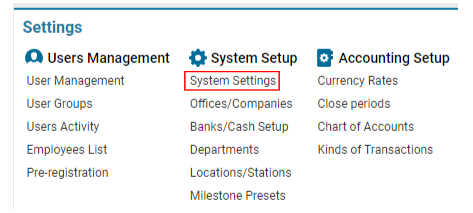
Navigate to the Settings section and under System Setup click the “System Settings” button.
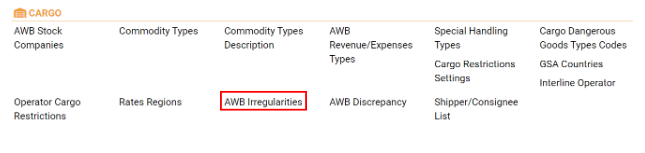
Then navigate to the Cargo section and click the “AWB Irregularities” button.
-
Overview
AWB Irregularities is designed to allow users to search, update, add, and delete different types of irregularities, as well as link them to specific discrepancies.
-
Main Functionalities
-
Search Bar: Utilize the search functionality to quickly find irregularities by entering relevant keywords like codes, names, or descriptions.
-
Irregularity List: This list displays the current irregularities along with their associated details, such as code, name, description, and linked discrepancies. Examples include "IGT," "BNZ," "GTA," "REW," "WER," "RTY," and "UTY."
-
Buttons:
-
Update: Click to update the details of a selected irregularity.
-
New: Click to add a new irregularity to the list.
-
Delete: Click to delete a selected irregularity from the list.
-
-
Adding or Editing an Irregularity
-
To Add a New Irregularity:
-
Click on the New button.
-
Fill in the mandatory fields:
-
Code: Enter a unique code for the irregularity (e.g., "IGT").
-
Name: Provide a name for the irregularity (e.g., "IGT irregularity").
-
Description: Add a description detailing the nature of the irregularity.
-
Type: Specify the type of irregularity.
-
Linked Discrepancy: Select or input any discrepancies linked to this irregularity.
-
-
Save the new irregularity by following the prompts.
-
-
To Edit an Existing Irregularity:
-
Select the irregularity you wish to edit from the list.
-
Modify the necessary fields, such as the code, name, description, or linked discrepancies.
-
Click on the Update button to update the irregularity's details.
-
-
Deleting an Irregularity
-
To Delete an Irregularity:
-
Select the irregularity you want to delete from the list.
-
Click on the Delete button.
-
Confirm the deletion in the dialog box that appears. The irregularity will be removed from the list.
-